Vitamin D
The videos in our general article on Processing Pathology Results use Vitamin D as an example, so please view the article for more information about how results for Vitamin D are managed by our system.
Vitamin D Template
The page below is a summary guide to the Vitamin D page of the Pathology Template. Click on the image to view a larger version and download a copy.

System Summary
The table below is an overview of how results for Vitamin D are auto-reviewed and how the outcomes are managed.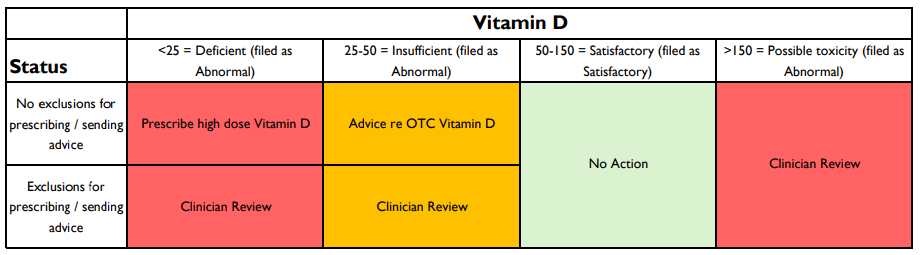
Related Articles
Pathology Planner
To download our Welby Innovate Pathology Planner, click the link below. We recommend saving a practice copy on your server that is shared by all involved in running the pathology system.How do I process pathology results?
Using our full pathology system requires running our clinical reports to identify patients who need further action, and using our templates to then review individual patients. Pathology Planner If you haven't already, we recommend downloading and ...Introduction to the Pathology Module
This demo video for our Pathology Module gives a good general introduction to the module. Please get in touch with us if you would like to discuss using the Pathology Module at your practice.Getting Started with the Pathology Module
Some elements of our Pathology Module can be used immediately with little training or support from us. Quickstart for Clinicians This video should be shared with all clinicians who file results. It's a quick start introduction to the Pathology Module ...How do I activate the Pathology Auto-Review Rules Engine?
If you are already using auto-review rules in your practice, you will not need to do this. If you're not yet using auto-review rules, make sure that everyone in the practice who files results is aware of the plan to introduce them. You need to ...