How do I activate specific auto-review rules?

Make sure you have first enabled the Auto-Review Rules Engine in your SystmOne. How do I activate the Pathology Auto-Review Rules Engine?
When you first start using pathology, your practice will be configured to only file satisfactory results where no further action is required. As you start to roll out the full module, we will work with you to gradually enable filing abnormal results where actions are managed through clinical reports and automations. Please see the article Processing Pathology Results for more information.

You can check your setup by running the clinical reports in the folder Welby Innovate Pathology / Localisation. Each section in this folder starts with a report like the one below. If the count for this report roughly matches your list size, it means that result is configured to only file satisfactory results.

To activate specific auto-review rules follow the steps below.
Review the auto-review rules available
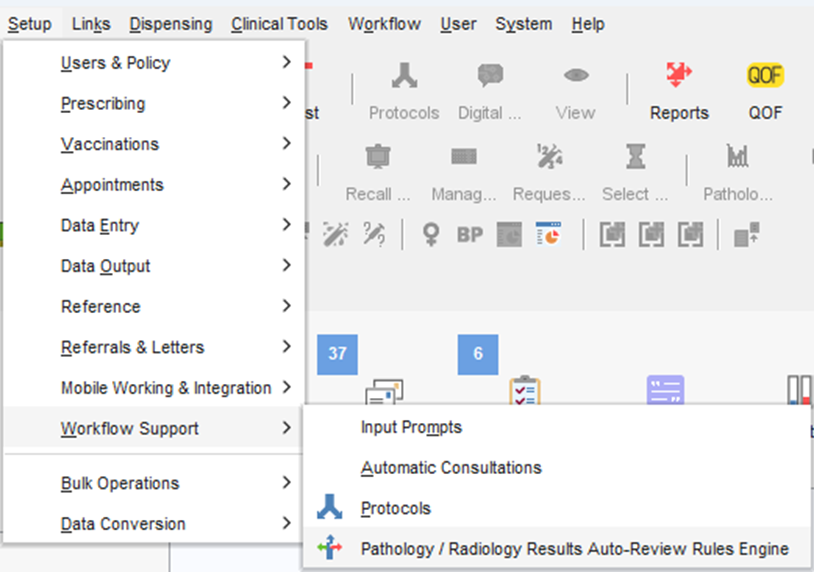
Navigate to Setup / Workflow Support / Pathology/Radiology Results Auto-Review Rules Engine:
It can help to order the rules by clicking on the Investigation header.
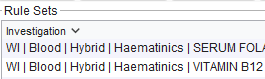
All of our rule names start with WI, then the type of test (Blood, Cytology, Urine etc), then the type of rule (Hybrid, Satisfactory, Unknown), then the test name and code and finally details about how the rule works.
- Hybrid = the rule will behave according to your practice setup. If its enabled, it will file many abnormal results as well as normal. Otherwise, it will only file satisfactory results.
- Satisfactory = the rule only ever files satisfactory results where no further action is needed.
- Unknown = the rule will file the result as unknown because the actual result isn't yet present, or the result is not negative/positive or satisfactory/abnormal. This type of rule is much less common.
For example we have created the auto-review rule below.
WI | Blood | Satisfactory | LFT | X77WP | Files if Normal on lab report or All investigations are within normal range - Liver function tests (X77WP)
The name of the rule explains how it works as follows.
- WI = Welby Innovate
- Blood = Relates to blood results
- Satisfactory = Only files satisfactory results where no further action is required
- LFT = Relates to LFTs
- X77WP = The specific code or title the rule is looking for
- Files if Normal on lab report or All investigations are within normal range = How the rule works
- - Liver function tests (X77WP) = added by SystmOne, the code or title the rule works on
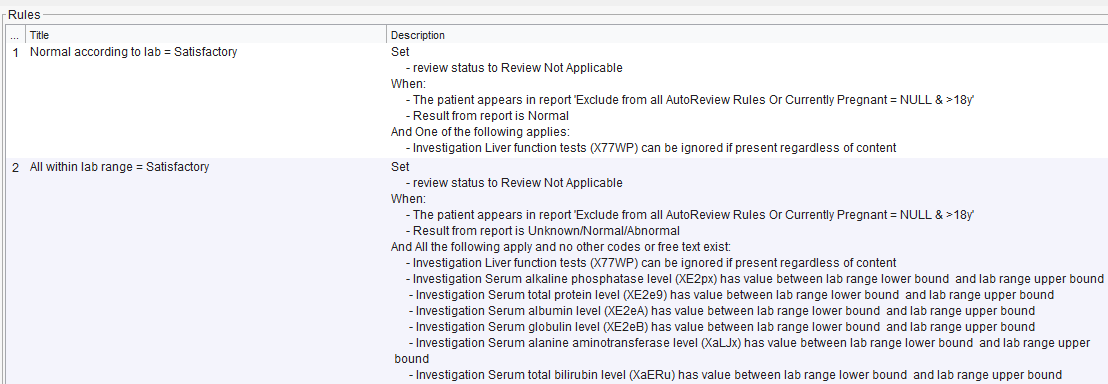
You can see even more detail on the right hand side where each stage of the rule appears:
Activate the auto-review rules you want to use
Work through the list of rules, making active the rules you want to use by clicking the box to the right of the rule name.
Its possible to mix and match rules that you use. All of our rules start with WI | but you may already have rules of your own or provided by others that you want to use too.

The one thing you can't do is have multiple rules enabled that are trying to file the same result.
In many cases we have multiple versions of the same rule available. This is because we work with practices using different labs.
For example, most labs return LFTs against the code "Liver Function Tests (X77WP)" but there are some that use a free text heading of "Liver" or similar. Rather than worry about which ones your lab uses, you can turn them all on and SystmOne will only apply the rules that work for your lab.
If in doubt, don't enable a rule. Its better to start slowly and gradually build up.