How can I run my flu and covid vaccination campaigns?
Introduction
There are reports in each of the folders 8 Flu Only and 8 Flu and Covid for you to check eligibility for flu, as in the screenshot below ...




- Reports for ADULT patients who are eligible but do not have consent recorded yet. These are for information and to check your progress with gaining consent.
- REVIEW FIRST reports. These reports identify patients who had the same vaccine last year as they will be given this year, and who were given the vaccine last year by a Registered Health Professional (RHP). You can code this consent now, and it will carry forward to this year as well. To do this, you need to run each REVIEW FIRST report, then right-click the report and choose Breakdown Results. Choose Event done by and Event month and year as your breakdown options, as in the screenshot, and click the button to Refresh. Please note that if you have Nurse Associates in your list of staff, they cannot independently obtain informed consent, so do not include them in the next part of the process. For all the other RHPs in the list of staff, add the three codes specified in the report name, with a date of the first day of the month the vaccine was given.
- Reports to SEND vaccination consent questionnaires. You need to allow a day after processing the REVIEW FIRST reports before running these reports, to allow the consent codes you have added to be taken account of. The consent questionnaires include a link to the Patient Information Leaflet for the specific vaccine they are being offered this year.
There are reports in the folders Welby Innovate Prescribing / 8 Flu Only and 8 Flu and Covid to help you identify patients who need may need PSDs adding to their record. There is a more detailed article on how to bulk add PSDs here.


Navigate to the reports Welby Innovate Prescribing / 8 Flu Only or 8 Flu and Covid depending on whether you are offering Covid vaccinations along with Flu vaccinations for this campaign.
- If you are planning to use only Registered Health Professionals to give vaccinations this year, you can use the invite reports under the section headers below, depending on whether you are offering Covid vaccinations along with Flu vaccinations.
- If you are using HCAs, Nurse Associates or other support staff to give vaccinations, you will find patients split into separate invite reports depending on whether they have consent recorded. You will find them under the section headers below, depending on whether you are offering Covid vaccinations along with Flu vaccinations.
- In all sections you will find separate sets of reports for children, pregnant patients and adults.
- There are separate reports for sending appointment booking links, messages without booking links, and letters. The booking links you will need are as follows, depending on whether you are offering Covid vaccinations. You will also need versions of the appointment booking links with (RP) at the end if you are using our consent process.
- There are separate reports for sending 1st, 2nd and 3rd invites.
- If you have attached the flag Injection to your Flu and / or Covid clinic appointments, patients will not be sent further invites once they have booked one of these appointments.
If you have chosen to be prompted to book patients in for either flu or flu and covid vaccinations, the Green A appointment prompt will be visible in the demographics box for eligible patients who don't already have an appointment. When you click on the Green A, a prompt similar to the one below will appear, depending on which vaccines the patient is eligible for and which vaccines you are giving at your practice ...

You can request that the vaccination template launches automatically when a consultation is started in a flu clinic. Alternatively the vaccination template can be accessed from the sidebar or demographics alert by clicking on this icon ...

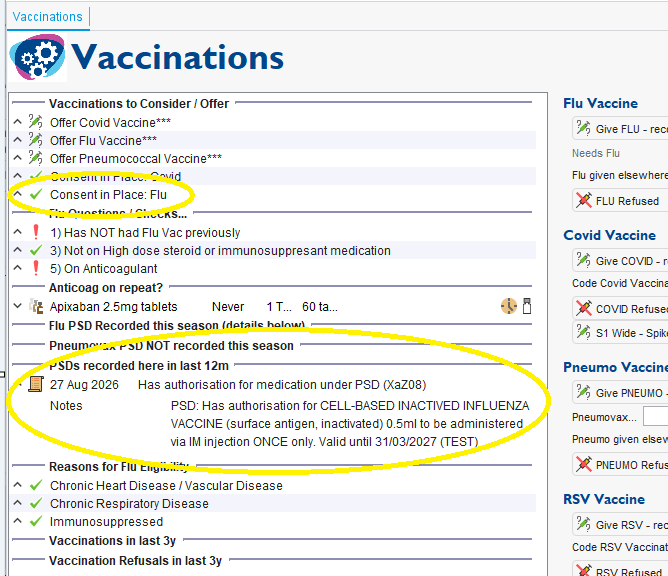
This template displays useful information, including whether the patient has PSDs recorded, and quick entry protocols for giving a number of different vaccines, including flu and covid ...

For each vaccine, we've got various options, but the main one to use is the button that says "Give xxx". This will launch a protocol that checks the staff role. If an HCA is using the system, it will check for an appropriate PSD. Each protocol records the appropriate vaccine, advice given and whether the vaccine was administered under a PSD or PGD.
Give it a try on a test patient and let us know if any issues or the vaccines aren't correct for your practice.

For example you may start your campaign offering IIVc to patients <65 and aIIV to patients 65+, but have insufficient vaccine to vaccinate all your older patients with aIIV and have to switch to IIVc for all patients. If you have used our consent process, patients aged 65+ by the end of the flu season will only have consent recorded for aIIV. We would therefore recommend letting us know you have changed the vaccines that you are using, to IIVc for all patients. Once we have updated your localisations, patients who need to give consent for IIVc now will appear in the appropriate reports. Alternatively you could choose to use Registered Health Professionals to vaccinate all your patients aged 65+, so that consent can be gained at the time of vaccination.
The reports to invite patients are split into separate sections for children (<18), adults (18+) and pregnant patients (18+). We know that some practices may want to invite patients to separate clinics based on their age, especially if they are using different vaccines for different age groups, for example aIIV for patients aged 50+ or 65+. In this case we recommend breaking down the adult invite reports by date of birth, then sending invites separately for each age group.
If you are running drop-in clinics and using both Registered Health Professionals and non-Registered Health Professionals to vaccinate patients, you will need to check whether consent and a PSD has been recorded, before directing them to the appropriate staff member for vaccination. The way to do this 'at the door' is to launch the Vaccinations template and check for both consent and a PSD, as in the example screenshot below. If they are not in place then patients would need to be consented and given the vaccination by a Registered Health Professional.